
Wunder Mobility changelog
Release 11-2026 - Smarter Ops Map & Expanded Automations
Highlights
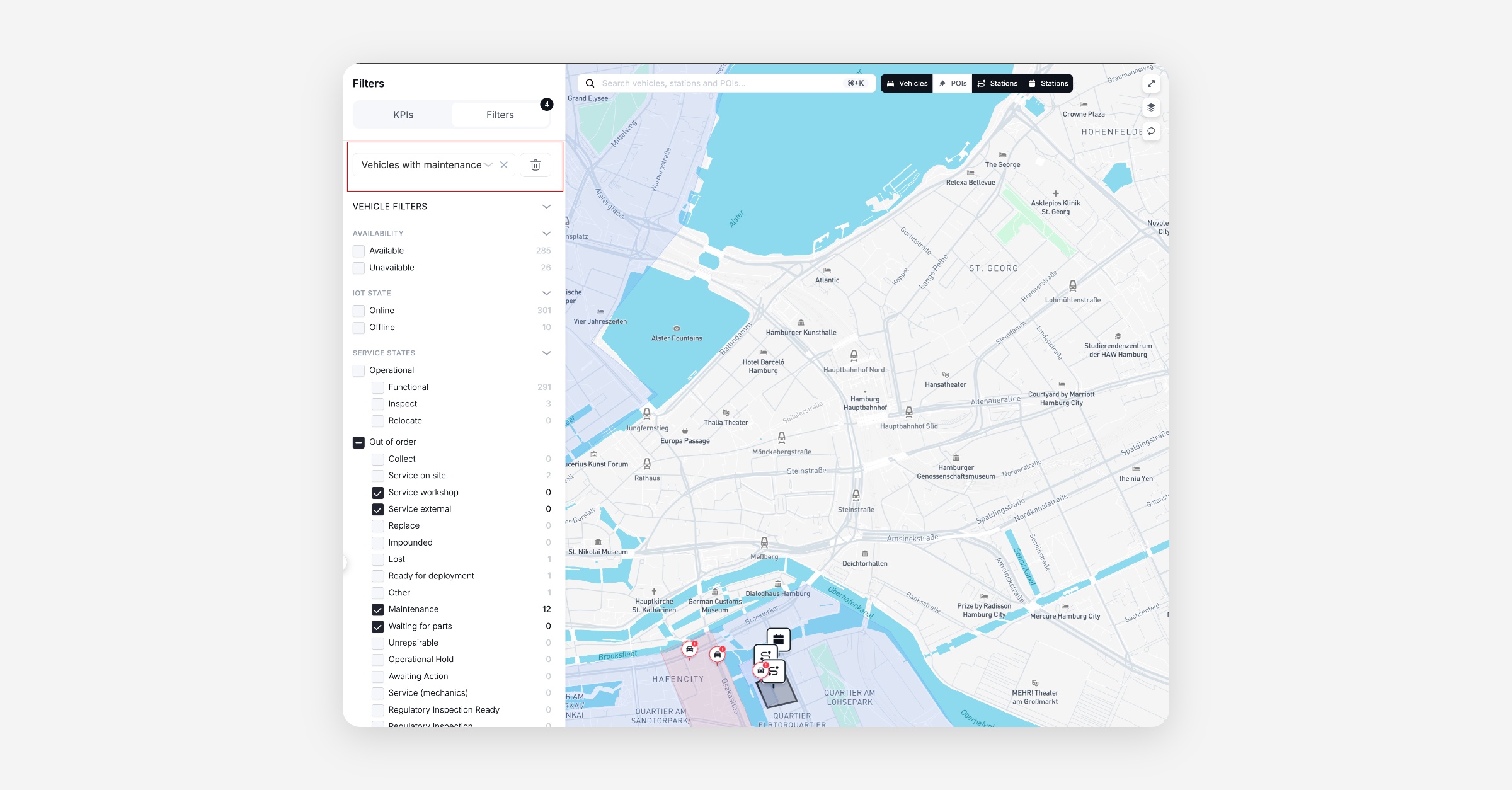
Smarter Ops Map: Filter presets let operators save and reuse their most common filter setups, decommissioned assets are hidden automatically, and vehicles without IoT now show as offline — making the daily fleet overview cleaner and faster to work with.
Mobile App
General
Offline screen no longer flashes on app resume: Fixed an issue where returning the app from background in some cases briefly showed the offline screen even with active connectivity, preventing unnecessary user concern.
Apple Pay and PayPal visible in the wallet: Payment methods for Apple Pay and PayPal display correctly on the payment card screen again, so customers can select their preferred payment option.
Web App
General
Event timestamps reflect actual session times: Fixed an issue where the web app was sending identical start and end timestamps for events, so analytics and session data now accurately capture real durations.
New Dashboard
General
Filter presets on Ops Map: Operators can save and re-use their most common filter combinations on the Ops Map, speeding up daily operational workflows instead of re-applying filters every session.
Decommissioned vehicles and stations hidden from Ops Map: The map no longer shows decommissioned assets, reducing visual clutter and letting operators focus on the active fleet.
Vehicles without IoT shown as offline: Vehicles that lack IoT connectivity are now explicitly surfaced as offline on the Ops Map, making it easier to triage connectivity issues at a glance.
IoT module visibility respects operator permissions: IoT modules in the Dashboard now display based on the operator's module permissions, ensuring role-appropriate access to device data.
New Automations Four new automation triggers are now available in the dashboard:
reservations repeatedly cancelled,
rentals repeatedly ended with no movement,
vehicles repeatedly receiving 1-star ratings, and
vehicles repeatedly receiving 1-3 star ratings.
Operators can now automate responses to these patterns without manual monitoring.
Package Discounts in the UI: Resolved an issue where Package Discount Vouchers were not visible in GoDash, creating confusion and preventing operators from cancelling them.
B2B
Payment method removal for business accounts fixed: Resolved an error in the Dashboard that prevented operators from removing a stored credit card from a business account, restoring the ability to manage corporate billing and swap out outdated payment methods.
Booking
Task Template Duplicate Handling Operators can now define how each task template behaves when an automation triggers and a matching task already exists: ignore the automation, replace the existing task, or always create a new one. Tasks that are in progress are better protected, allowing control over automation behavior and preventing unintended task churn or duplication.
Overdue booking notifications for end users: When a booking is not returned within a configured time after its scheduled end time, an overdue notification is automatically sent to the end user. Cancelled and expired bookings are excluded.
Platform
General
RFID card pickup updates rental state to DRIVING: When a customer picks up a vehicle using an RFID card, the rental state now correctly transitions to DRIVING, keeping the operator dashboard in sync with actual vehicle usage.
Payment state update for business accounts fixed: Resolved a backend error that prevented payment state updates for business group accounts, ensuring billing state transitions complete reliably.
Subscription invoice linking: The
/back/user-subscriptionsendpoint now returns the last invoice ID. This is a preparatory step for a new Subscription Cancellation feature.
On-demand
Vehicle category filtering by branch: The
/front/vehicles/categoriesendpoint now correctly filters categories by branch, ensuring end users only see relevant vehicle types for their location.
API
General
Webhook for "Moved outside of rental" fixed: The webhook now correctly emits events when a vehicle is moved outside of an active rental, restoring automated downstream workflows.
New Webhook Event: A new
TASK_CREATEDwebhook event is now available, enabling real-time notifications when a task is created.Benefit cancellation on subscription end: A new
cancelBenefitsoption on the subscription cancellation endpoint gives operators control over whether benefits are cancelled when ending a subscription.Benefit application logic clarified:
applicablePriceTypehas been moved into thecostSourcedefinition, making benefit application more consistent and predictable. This also resolves edge cases in rebate calculations where multiple complex configurations could produce unexpected results.Additions endpoints consolidated: Two separate additions endpoints have been merged into one, simplifying API usage and reducing integration overhead for managing additions.
Coordinate timestamps in telematics data: Location change events now include timestamps, improving traceability and sequencing for telematics data consumers.