
Wunder Mobility changelog
Release 41-2026 - Map Discovery, Booking Fixes & Platform Resilience
Highlights
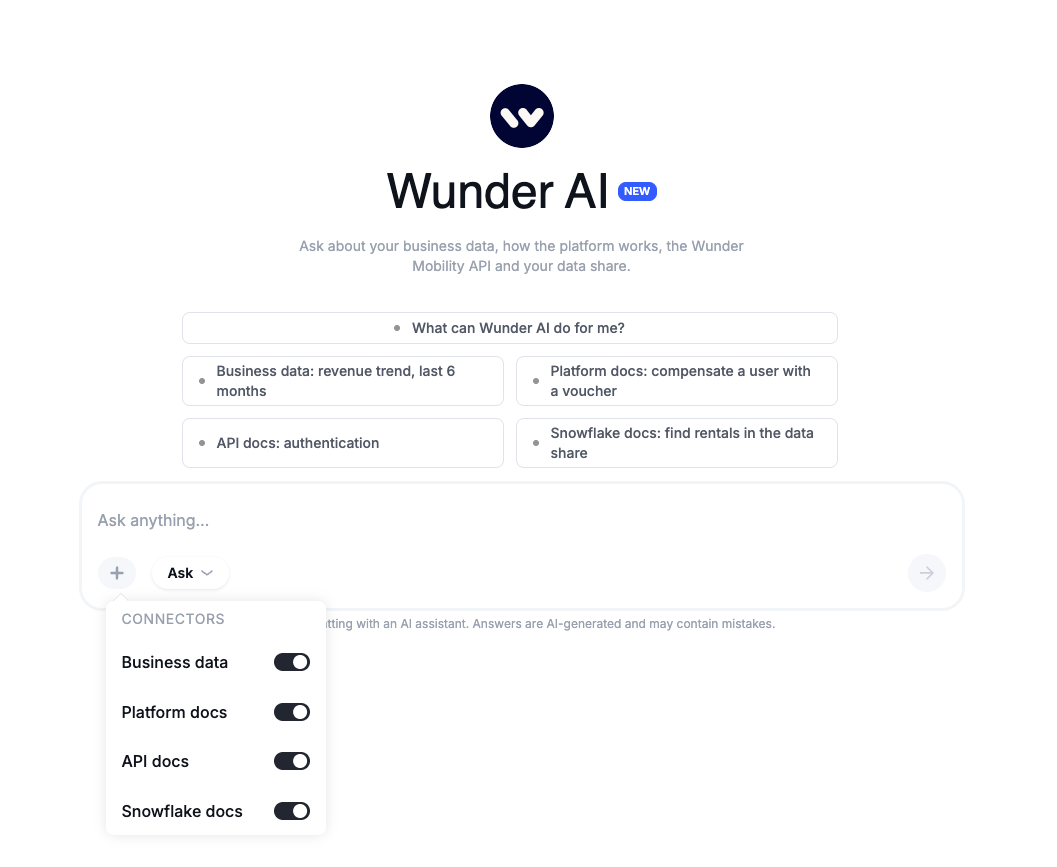
Wunder AI now answers from your documentation, not only your data: Ask Wunder AI how something works in the platform, how to use the Wunder Mobility API or what is in your Snowflake data share, and get the answer with its source. The new start screen shows what you can ask in each area.
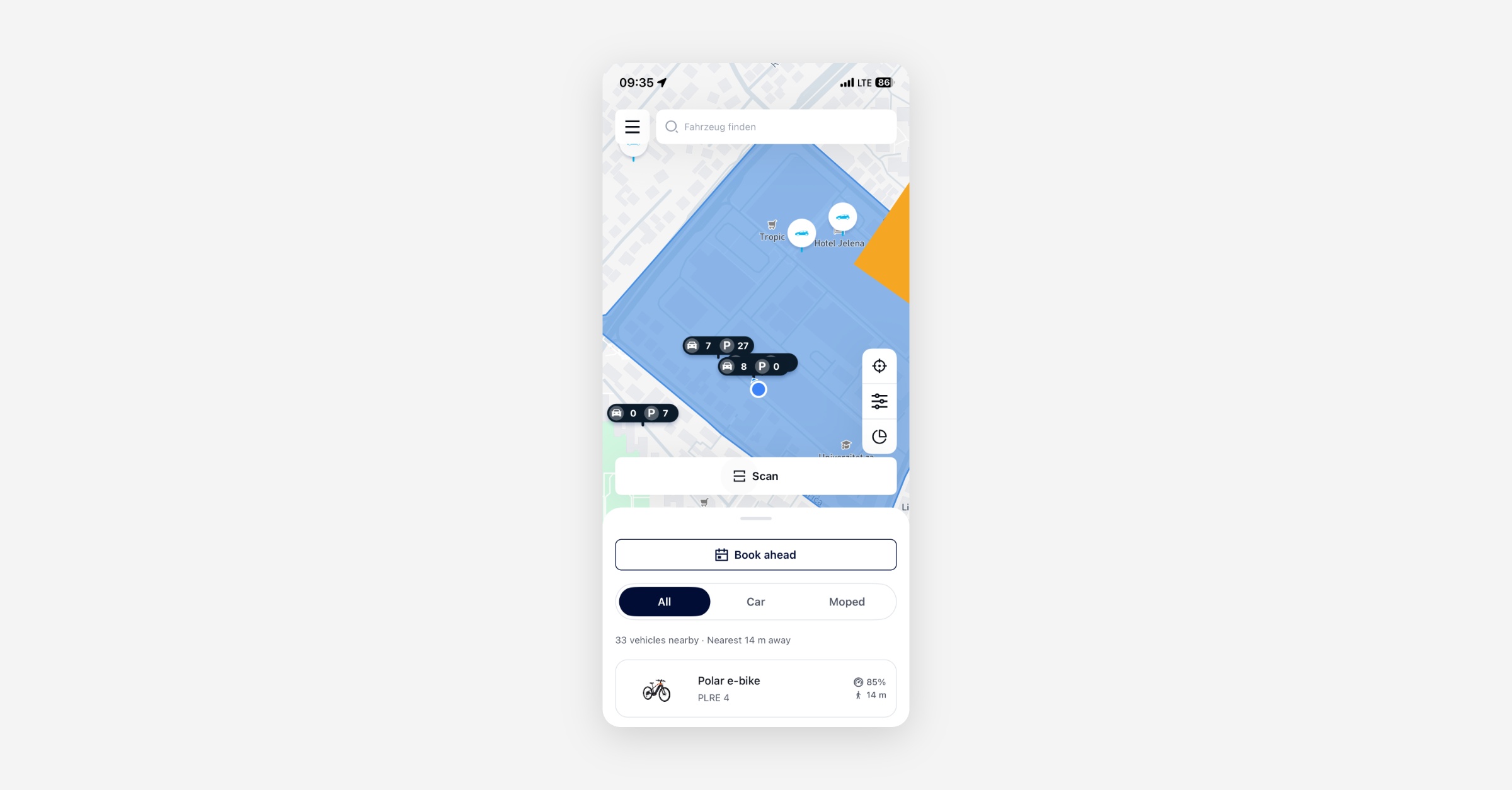
Nearby Vehicle Sheet on the On-Demand Map: Riders using the on-demand map will now get a bottom sheet listing vehicles close to them, with distance and battery level shown at a glance, without panning and tapping individual map pins. The sheet can be expanded and minimized to give the user the chance to see more or focus on the map interaction. The nearby-sheet should your the users to find the ‘best’ vehicle faster without longer map interaction.
Mobile App
Requires the latest app version. Contact your Customer Success Manager for details.
On-Demand
Nearby Vehicle Sheet: Riders on the on-demand map will see a bottom sheet at their preferred height to see the vehicles nearest to them, sorted by proximity with distance and charge level visible before tapping a pin. This removes the need to pan the map to find available vehicles and check across them.
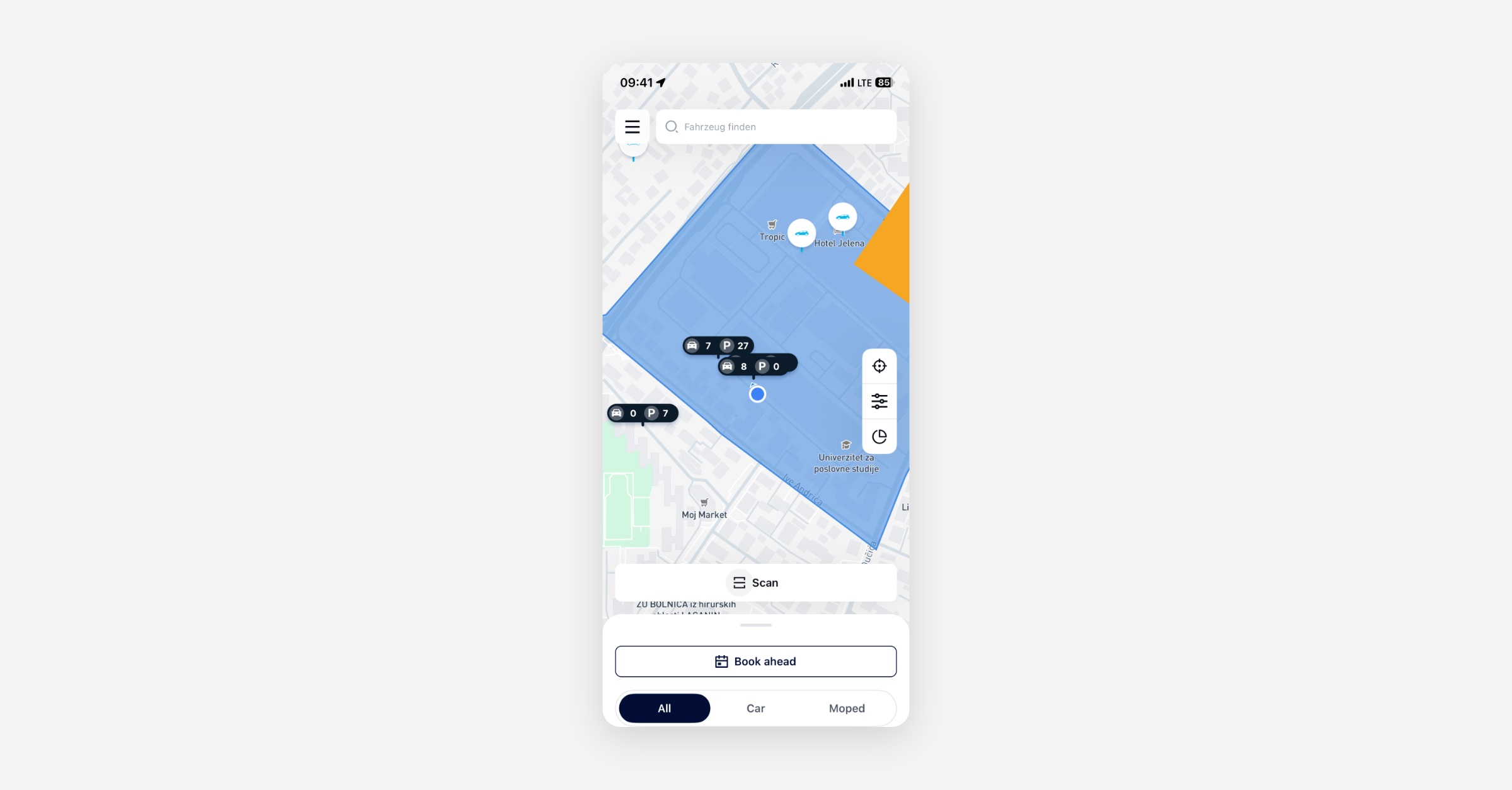
Repositioned Map Controls: The menu has been moved to top left position to give more space to the map control elements as locate-me, search, filter, and radar on the on-demand map home screen.
Booking
Booking Timestamps on Non-Latin-Numeral Devices: On devices set to a locale that renders numerals in Eastern Arabic-Indic digits, the app was sending booking start and end times the backend could not parse, returning an error and preventing the booking from completing. Timestamps are now always sent in the format the backend expects, regardless of device locale.
S153 Error on Valid Booking Requests Resolved: Some users were seeing a recurring "start or end time is in the past" error (S153) during normal booking use on the latest app version. The root cause has been identified and corrected so that valid booking requests no longer trigger this validation error.
General
App Launch Error After Bad Charging Station Data: If a malformed charging station list was saved to the device, the app showed a generic error screen on every subsequent launch and no retry cleared it. The cached data is now validated and replaced on the next successful fetch, so the app loads normally again.
New Dashboard
Booking
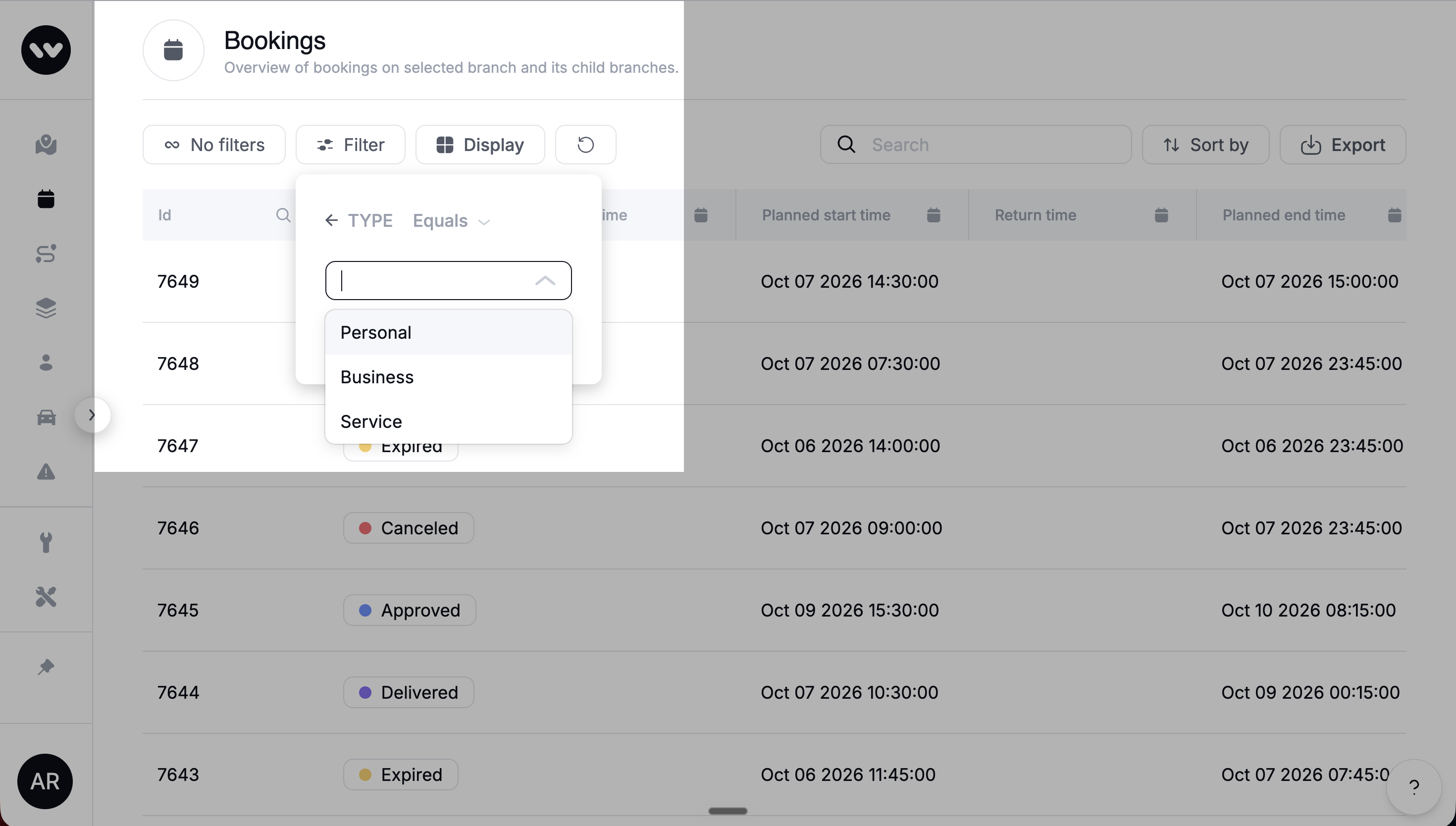
Booking Type Filter: The Bookings list now includes a filter by booking type (Personal, Business, Service), and the Type column displays the same values. The earlier filter by Station or Floating has been removed, as Floating bookings are no longer in use. Operators can now segment and search bookings by the categories they actually work with.
Extending a Booking Whose Start Is in the Past: When an operator edited a booking whose start time was already in the past, the dashboard blocked the change with a "start time must be in the future" error even when only the end date was being extended. This is now corrected: operators can extend the end of an in-progress or past-start booking without the start-time validation firing.
Service bookings show the cooldown that actually applies: When you create a service booking, the cooldown is set to 0 minutes and can't be changed. Before, the field showed your default cooldown, but it was never applied to service bookings. The vehicle is available again as soon as the service booking ends. If you need a cooldown after a specific service, you can add one by editing the booking after it's created.
Service bookings are no longer blocked by vehicle availability checks
Field teams can now start a service booking on the assigned vehicle even when it is below its target charge level, set to Out of Order, or on critical battery. These checks exist to protect end users, so they no longer stop your staff from reaching the vehicles they need to charge, clean or repair. Customer bookings are checked exactly as before, including the charging restriction.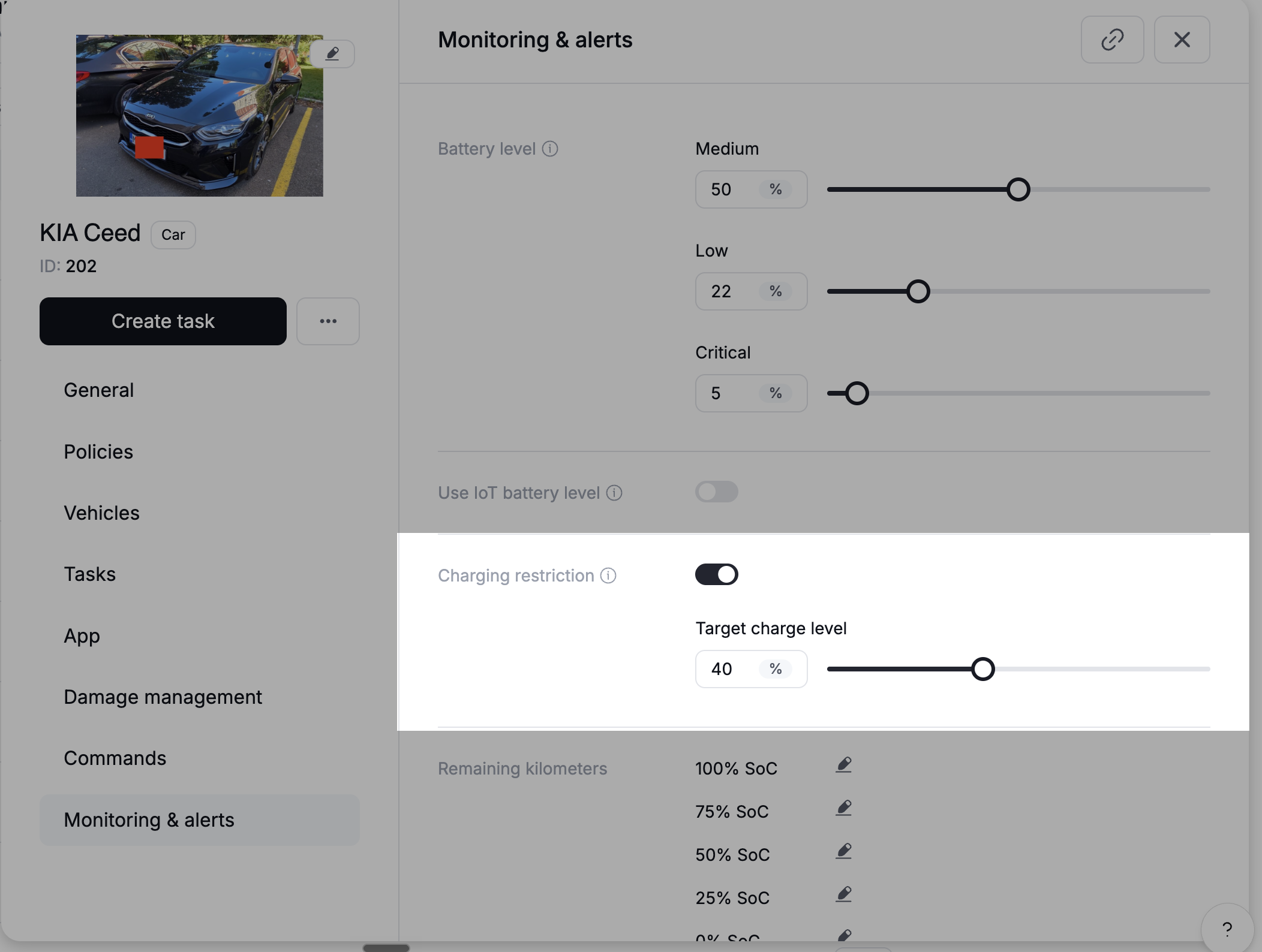
General
Dashboard maps now show only active promotion and surcharge areas
Deactivated geofence promotions and surcharge areas used to appear on the map next to active ones, so it was hard to tell which were actually in force. Every map in the dashboard now shows only active areas. Deactivated areas are still in your list, where you can reactivate them anytime.Swapped Latitude and Longitude Labels Corrected: The rental events view in the Dashboard was displaying longitude values under the "Latitude" label and vice versa. The labels are now aligned with the correct coordinate values.
Blank Localization Overrides Now Fall Back to Platform Default: If a localization override contained only whitespace, the platform returned it as a valid value and the app rendered a notification with no text. Overrides that contain only spaces or line breaks are now treated as absent, and the built-in platform default is used instead.
Platform
Booking
End users get another reminder after extending a booking: End users get a reminder shortly before their booking ends. If they extended after that reminder, they didn't get another one before the new end time. Now they do, as long as the new end time is further away than your reminder setting. If they extend before the first reminder was due, the reminder simply moves to the new end time.
Booking Price Calculator Returns a Clear Error for Unconfigured Pricing: When the booking price calculator was called for a branch and vehicle category with no pricing bundle assigned, it returned a server error (HTTP 500). It now returns a proper client error (HTTP 404) with a message that makes the missing pricing configuration visible, matching the behaviour of the back-office endpoint.
Max Booking Duration No Longer Defaults to Zero: When the maximum booking duration setting was absent, the backend fell back to zero, which blocked bookings or edits with a "duration exceeds maximum" warning. The backend now uses a safe default so missing configuration does not behave like a zero-duration limit.
Vehicles / IoT
ICCID Processing Skipped When Vehicle Module Is Unlinked: Unlinking a vehicle module during a telemetry update window caused a processing error that surfaced as a server fault. The platform now checks for an absent module before processing telemetry and skips gracefully, preventing the error.
General
Branch Deletion Now Checks All Referencing Tables: The check that prevents deleting a branch still referenced by other records had drifted out of sync with the schema and missed several tables. Attempting to delete such a branch could result in a broken reference rather than a clean error. The check now covers all referencing tables, so branch deletion is blocked correctly when references exist.
HTTP 500 Replaced With Correct 4xx Errors for Common Framework Exceptions: Several runtime exceptions that represent client-input problems were falling through to a generic server error (HTTP 500). They now map to 409 Conflict or 404 Not Found as appropriate, making the responses actionable for callers and reducing false positives in error monitoring.
Vehicle Update With Malformed Position Returns a Readable Error: A vehicle update request that sent a position object missing the required type field returned an opaque parsing error with no indication of which field was wrong. The response now identifies the malformed field and explains what is expected.
API
General
Planner No Longer Strands Earlier Bookings in Favour of Later Ones: The vehicle planner was in some cases assigning a vehicle to a later-created booking and flagging an earlier booking as a conflict, reversing the correct priority. The planner now correctly protects the earlier booking and blocks the conflicting later request.
Task Assignee No Longer Cleared on Update: Updating a task via the API without including an assignee field was incorrectly removing the existing assignee. A PATCH request now leaves the assignee unchanged when the field is omitted.
Data / BI
Wunder AI
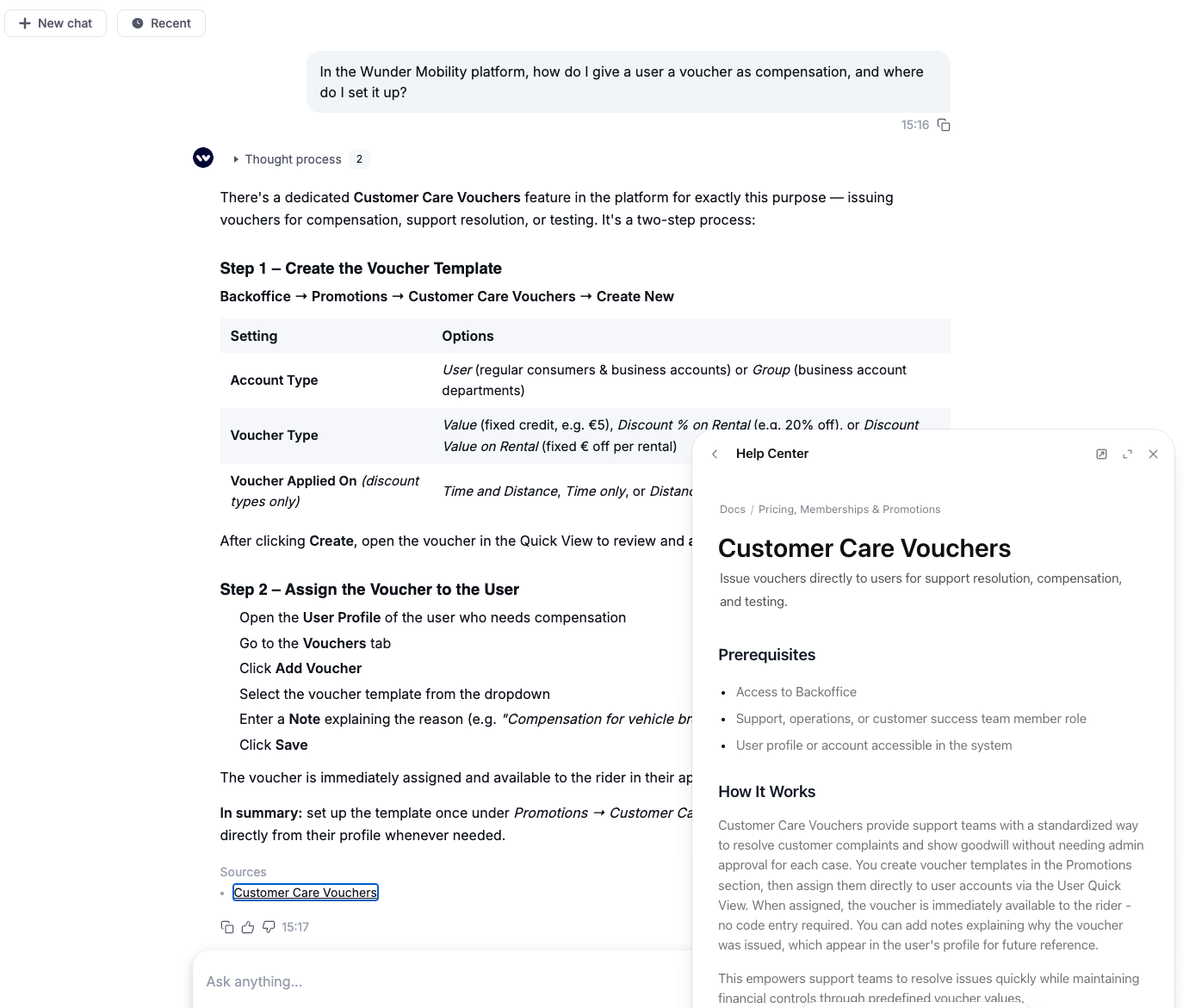
Ask Wunder AI how the platform works: Wunder AI answers how-to and configuration questions from the help centre and links the article it used, which opens right next to the chat. Try it: "In the Wunder Mobility platform, how do I give a user a voucher as compensation, and where do I set it up?"
Ask about the API and your data share: Wunder AI answers questions about Wunder Mobility API endpoints, authentication and webhooks, and about the tables, columns and KPI definitions in your Snowflake data share. Try it: "How do I authenticate against the Wunder Mobility API, and how long is a token valid?"
Choose which sources Wunder AI uses: The (+) menu next to the input lets you switch Business data, Platform docs, API docs and Snowflake docs on or off.
See what you can ask from the start screen: When you open Wunder AI, the start screen shows one example question per area, and "What can Wunder AI do for me?" gives an overview of what you can ask for your role.
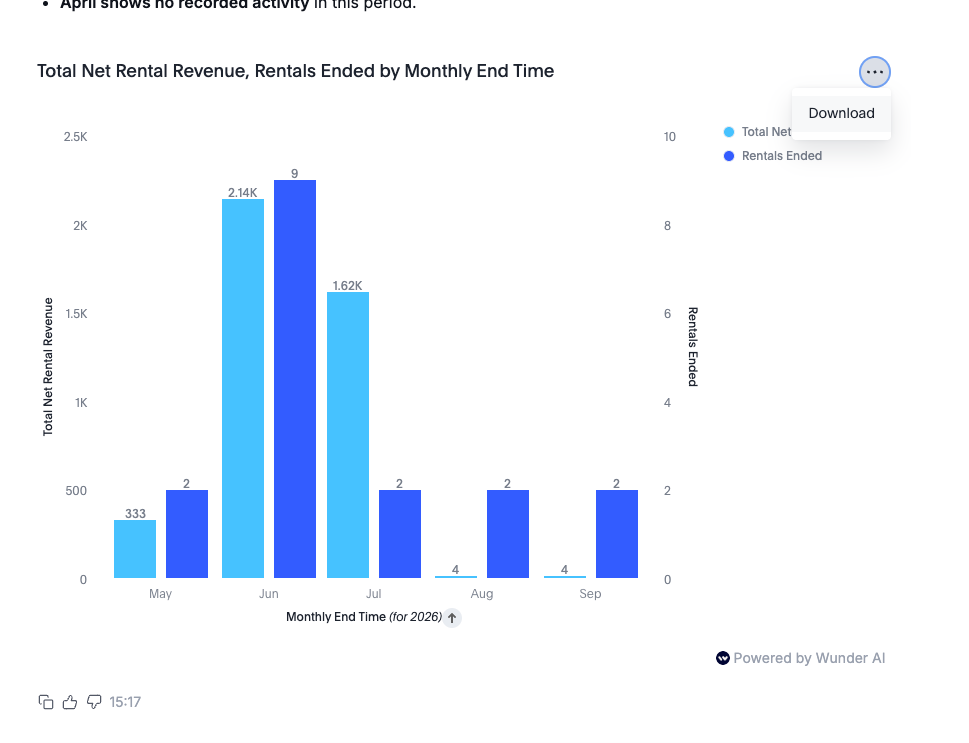
Interactive charts you can download: Charts in Wunder AI answers are now interactive instead of a static image. You can download them straight from the answer.
Track bookings that expire while waiting for approval: If you approve bookings manually, you can ask Wunder AI for booking approval timeouts, the bookings that expired before anyone made an approval decision, as a count or as a share of the bookings that needed one. No-show rate now counts only bookings that were ready for pickup and never collected, so on some fleets it reads lower than before. Try it: "Show booking approval timeouts and booking approval timeout rate by month for the last 3 months"
Mobile Release - 3.18.0
Booking
Booking times and station opening hours now show in the station's local time, so customers in a different timezone see the same times the station does.
On-Demand
New nearby vehicles sheet on the map home: the closest vehicles are listed with walking time and energy level, so riders find the nearest one without touching the map. The sheet rests at three heights.
The map home screen has a new layout: the menu button moved to the top left next to the search field and opens the drawer from the left, and the map controls (locate me, filter and radar) are stacked on the right edge.
Release 40-2026 - Billing & Fleet Intelligence
Highlights
Smarter Voucher and Subscription Handling: Several billing-correctness fixes ship this week covering pause-time charging on free-minute vouchers, subscription renewal for force-assigned plans, weekly voucher expiry around time zone boundaries, and rental endings blocked by custom customer care vouchers without a product attached.
Vehicle Error Intelligence for Operations Teams: The Service App now parses the raw binary error codes transmitted by OKAI vehicles into human-readable labels such as "Brake Fault" or "Motor Sensor Failure", enabling automatic repair-ticket categorisation and faster triage by street teams.
Mobile App
Requires the latest app version. Contact your Customer Success Manager for details.
General
Invoice downloads work again in the rental overview: Riders can once again download invoices directly from the trip history in the app. The persistent loading spinner and error that appeared on downloads have been resolved.
New Dashboard
General
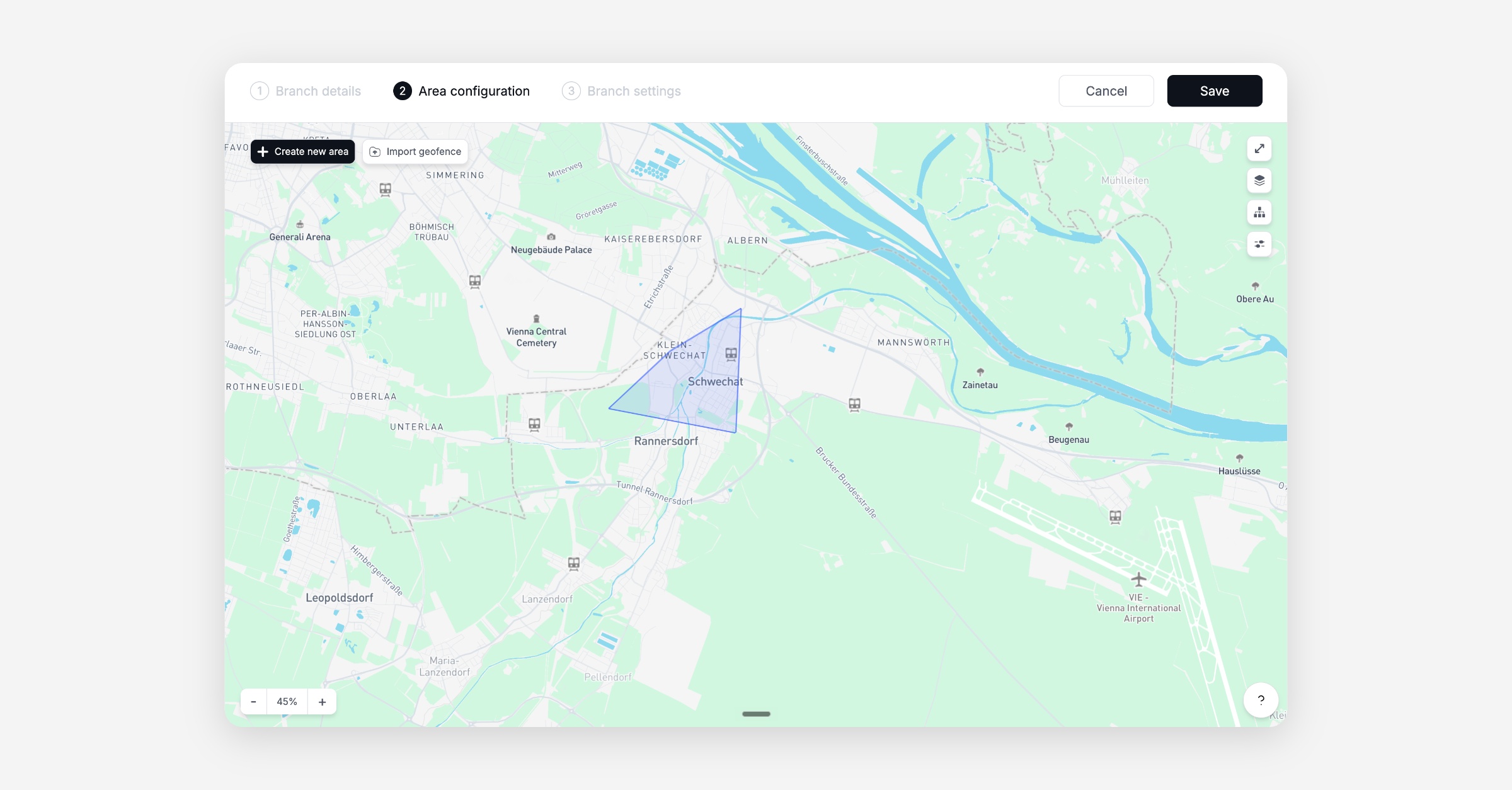
Import a GeoJSON area without drawing one first: When creating a new branch, operators can now import an existing GeoJSON file directly without first drawing a placeholder area on the map. The previous workaround of drawing a random area before importing has been eliminated.
Event log in the customer detail panel loads reliably: The customer events tab in the operator back office no longer times out under migration-era data volumes. The request now returns within a reasonable time instead of hanging until the gateway returns a 504 error.
Ending a rental from the Dashboard no longer returns an internal server error: Operators can now end active rentals from the rental detail panel without receiving a "Creation failed" error. The affected rentals could not be ended from the app either, so riders were also stuck.
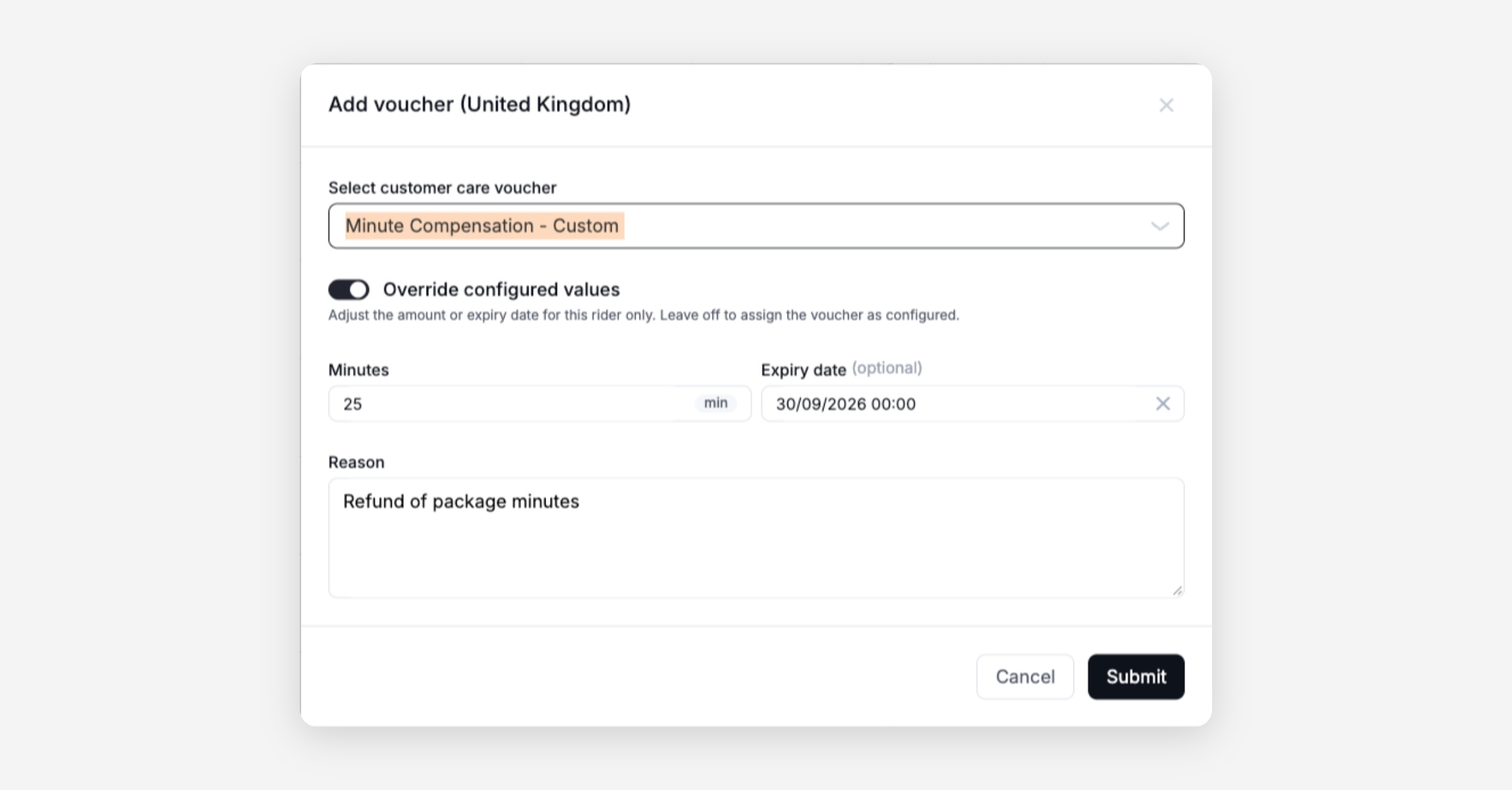
Custom voucher value and expiry configurable when adding to a user: Support agents assigning a customer care voucher from the user side panel can now set a custom monetary value or a custom number of free minutes, as well as a specific expiration date.
Vehicle card permissions corrected: Operators whose roles include vehicle card access but not identity document access can now list and create vehicle cards without being blocked. A mismatch between the permission checked by the system and the permission granted by the role had been silently preventing this.
Platform
General
Rental-state repair job no longer resets vehicles in use on another platform: The scheduled task that corrects vehicles stuck in an incorrect parking state now skips vehicles that are reserved or rented on a connected platform. Previously it could set those vehicles back to available, creating state conflicts across platforms.
Free-minute vouchers now cover pause time, not just riding time: Riders with a free-minute balance no longer get charged in cash for the paused portion of a trip. Previously, only the riding segment before the first pause was drawn from the minute balance; any paused time and subsequent riding were billed directly.
Force-assigned subscriptions renew correctly regardless of user tags: Subscriptions assigned by a support agent with an eligibility override now renew as expected. The renewal was re-running the tag eligibility check without the override, causing subscriptions to expire.
Weekly voucher validity no longer expires a week early near midnight: A timezone handling bug in the weekly validity window calculation has been corrected. Riders in non-UTC timezones were losing a week of voucher validity because the day-of-week check was evaluated against UTC rather than the branch's local time.
Back-office event log rejects invalid event types cleanly: Requesting the event log with an unrecognised event type now returns a proper 400 error instead of crashing the request with a 500.
API
General
MaaS partners can manage business accounts through dedicated API endpoints: A new set of MaaS group endpoints allows MaaS integration partners to create, update, and manage business accounts programmatically, including switching a business account to invoiced billing. Previously this was only possible through the impersonated user API, which requires acting as the end user rather than the partner.
MaaS business accounts exempt from the active group limit: The cap on how many active groups a user can belong to no longer applies to MaaS-linked business accounts. Because MaaS users are already counted as members of the provider's umbrella account, the limit could block them from joining or creating additional business accounts.
MaaS users can only join business accounts from their own provider: When a MaaS user joins a business account, the system now verifies that the account belongs to users of the same MaaS provider. This prevents cross-provider access and also excludes native tenant business accounts from the joinable set, which is the intended boundary for MaaS integrations.
GBFS station status feed no longer references an undeclared vehicle type: The GBFS validator error caused by stations listing a "default" vehicle type that was absent from the vehicle types catalogue has been resolved. The two feeds now derive their vehicle type lists from the same source.
GBFS system information now publishes app store links correctly: The GBFS system information endpoint now returns the configured iOS and Android store URIs in the
rental_appsfield. They were previously always returned as empty objects due to a key-naming mismatch between how the setting is stored and how it is read.GBFS free-bike-status responds faster: A query performance fix reduces the response time of the free-bike-status endpoint.
Booking branch filter and city count now agree on what counts as a booking station: The branch filter used in the booking flow and the cities list endpoint now evaluate "booking station" from the same field. Previously, branches whose operation mode was set correctly but whose legacy type flags had not been updated were counted by the cities endpoint and silently dropped by the branch filter, producing mismatched results.
Data / BI
Wunder AI
Revenue answers default to net revenue, excluding VAT: When you ask about revenue without saying gross or net, Wunder AI answers with net rental revenue, after discounts and excluding VAT, so the figure reads lower than a gross answer would. Each answer states which basis it shows, and asking for gross revenue by name still returns gross. Try it: "Show revenue by month for the last 3 months"
Active customers means customers who rented in the period: Ask Wunder AI for active customers or active users and you get the number of distinct customers who completed at least one rental in the period you asked about, with that definition stated in the answer. Sign-ups are a separate figure, and you get it when you ask for sign-ups. Try it: "Show active customers by month for the last 3 months"
Answers tell you when a number needs context: When a figure depends on something you should know, such as a month still in progress, the date range the data covers, or a measure whose definition is not yet final, Wunder AI says so next to the number. A group with no activity is shown as having no data, not as scoring 0%, and revenue answers say which revenue they cover, rental or billed.
Service App
General
Vehicle error codes translated into readable fault labels: The Service App now interprets the binary error codes transmitted by OKAI vehicles and displays them as human-readable labels such as "Brake Fault" or "Motor Sensor Failure". Operations teams no longer see raw hex values and can use these labels to categorise and route repair tickets automatically.
Mobile Release - 3.17.0
Booking
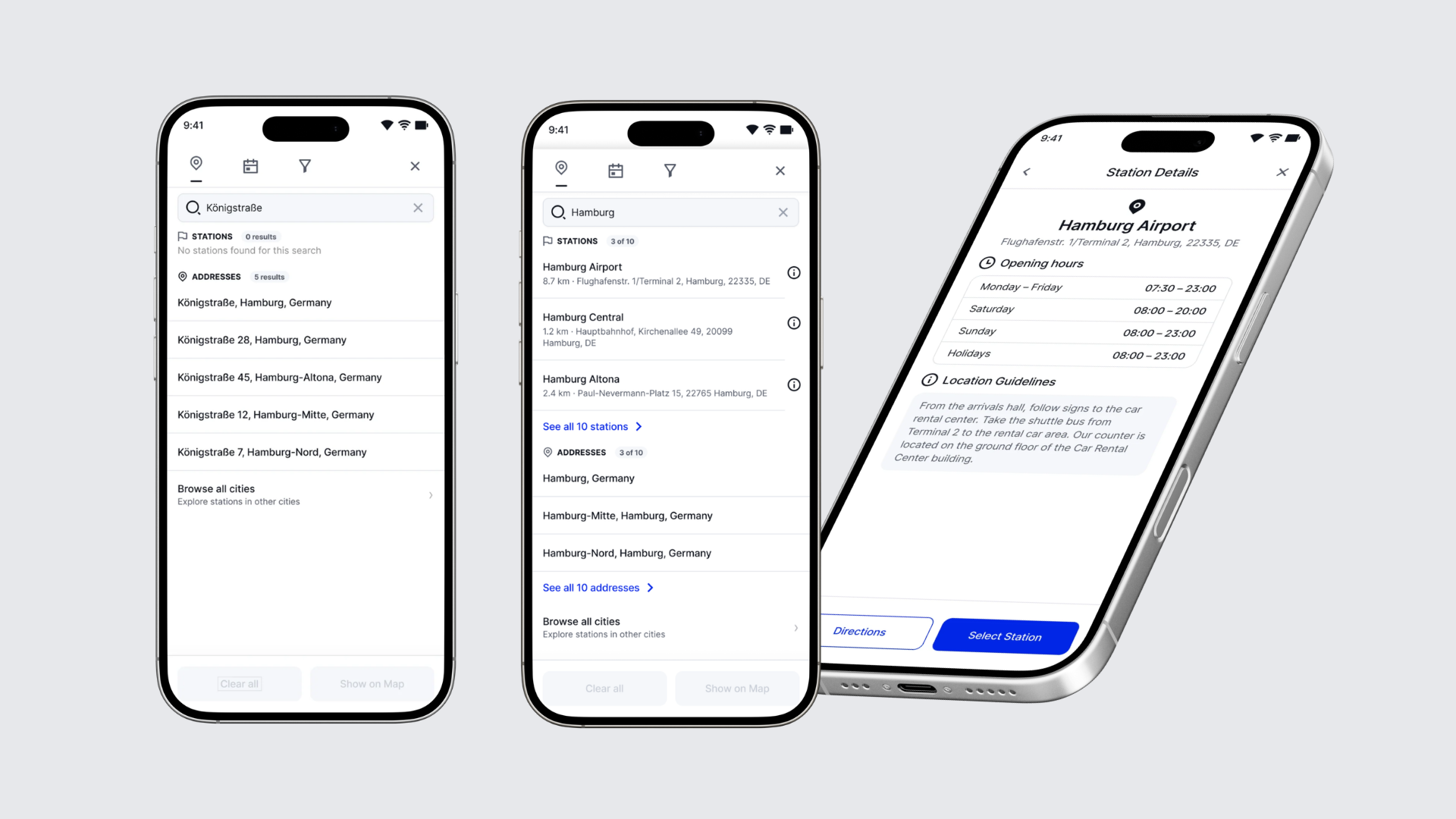
Booking search now separates stations from addresses: When end users search in the booking flow, the station they want no longer gets lost among streets and places with the same name. Results appear as they type, in two groups, Stations and Addresses, and each station shows its name and full address. If a group has no matches, it says so, so end users know straight away whether a place has a station. "Show on map" replaces the Search button and shows every matching station on the map.
Station details from booking search: End users can now check a station before they start a booking. Opening a station from the search results shows its Station Details: address, location guidelines and opening hours. From there they can get directions in their maps app, or tap Select Station to start a booking with that station already set as pickup.
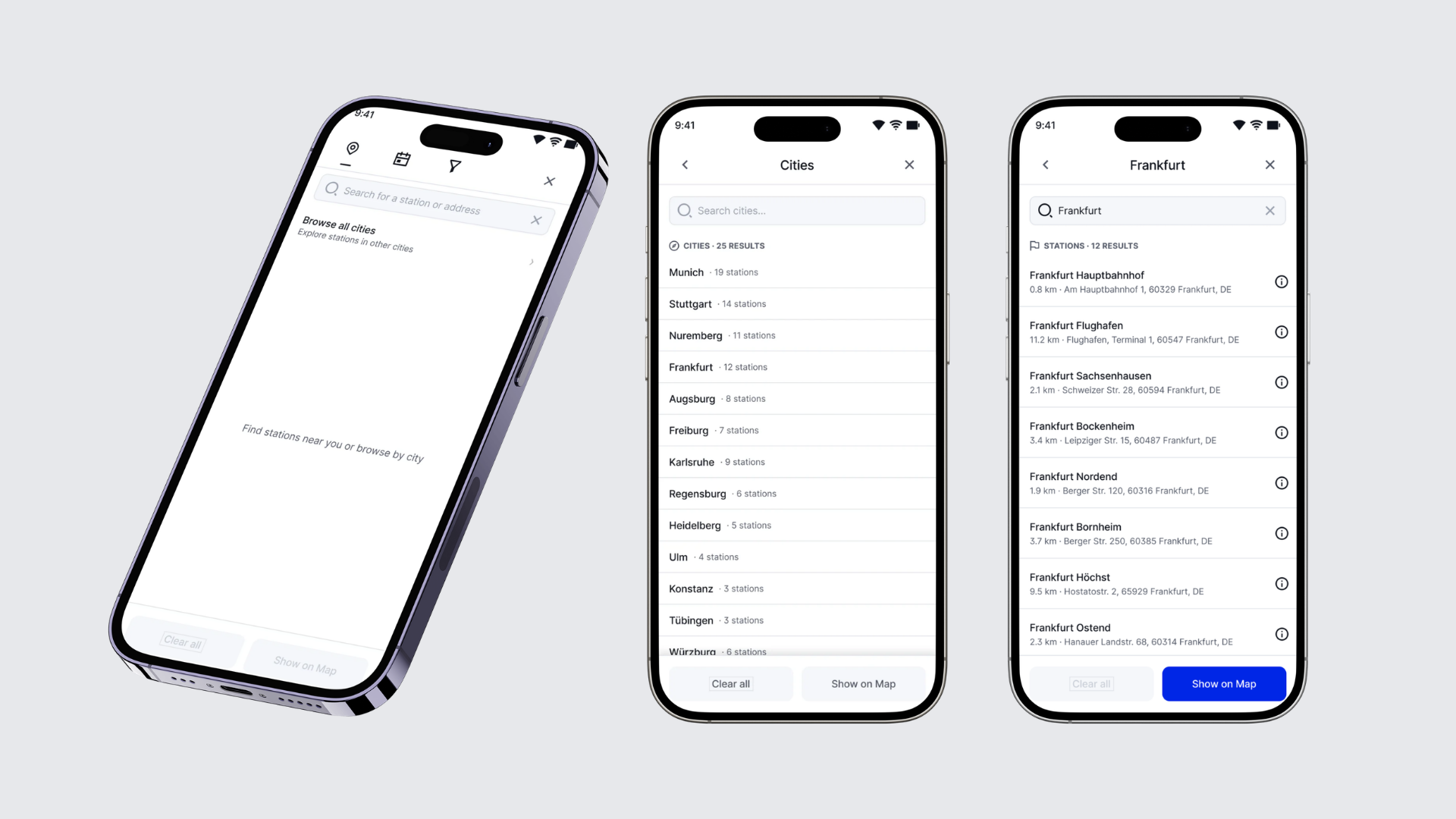
New - Browse all cities in booking search: Show end users exactly where you operate. "Browse all cities" on the search screen lists every city in your network with its number of stations. From a city, end users can see all of its stations on the map, open any station's details, and go straight into booking. It is off by default and can be turned on in your booking settings.
Filter tab hidden when nothing is configured: The booking search's filters tab is now shown only when your account has vehicle attributes configured, so customers no longer land on an empty tab.
Recurring booking search error fixed (S153): An expired date and time filter that stayed saved in the app could trigger the error every time the map moved, even after restarting the app. Expired filters are now dropped automatically, stations load without them, and the booking calendar no longer preselects them.
Release 39-2026 - Booking Cancellation and Rate Selector Improvements
Highlights
Operator-Controlled Cancellation Fee Waivers: Operators can now waive a cancellation fee on any operator-initiated cancellation, regardless of whether the customer-facing after-start cancellation setting is turned off. The waiver checkbox is now always available to operators, preventing situations where fees were silently charged with no override possible.
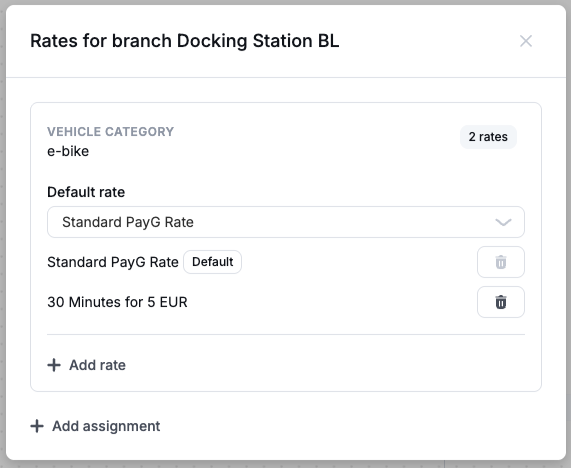
Rate Selector now available on On Demand Pricing Bundles: Rate Selector configuration is being moved over to Pricing Bundles. Multiple pricing bundles can now be assigned to a vehicle at a specific branch, allowing end-users to select which rate they want to use during rental start. Operators using the Rate Selector through deprecated pricing capabilities will be contacted and migrated automatically.
New Dashboard
Booking
Correct Tooltip When No Vehicle Is Assigned: When a booking had no vehicle assigned, hovering over an unavailable action showed "Insufficient permissions" rather than a useful explanation. The tooltip now clearly states that no vehicle has been assigned, so operators know exactly what to resolve.
Events Tab Filtering Now Applies to All Events: When filtering the Events tab on a rental the selected filters (event type, date range, error flag) now apply to vehicle events that occurred during the rental as well as the rental's own events. Previously, vehicle events came back unfiltered regardless of what the operator had selected, making it harder to isolate specific activity.
Filter the Events stream by type, date and operator
The Events tab can now be narrowed by event type, date, and the operator who triggered the event, with operators searchable by name. On accounts with a long event history you can go straight to the period or the activity you are investigating. Works on both the user and the rental Events tabs, and the error filter is unchanged.Reload Button Added Across Data Views: A reload button is now available on the rentals, users, and bookings views in the Dashboard. Previously, navigating away and back did not refresh the data, requiring a full page reload to see recent changes.
General
Identity Verification Rejection Now Visible in Dashboard: When a rider's identity verification is rejected by the verification provider, the rejection status now appears correctly in the Dashboard user view. Previously the status was not reflected, so operators could not see at a glance why a user was blocked from completing verification.
Invoice Detail View Loads Significantly Faster: The invoice detail screen now uses a dedicated endpoint that returns all line items, including refund breakdowns, in a single call. The previous approach required a slower back-office API call that averaged over one second per invoice and could reach five seconds where refunds were present. Operators will see invoice details load much faster.
Rate Selector Configuration Now Available in Pricing UI: The Dashboard UI for pricing bundles now supports configuring and managing multiple pricing bundles per branch and vehicle category, including setting a default bundle and enabling rate selection through the existing pricing options flow. This completes the operator-facing configuration for the rate selector behavior introduced in the backend earlier.
Custom Compensation Vouchers for Customer Care: Operators can now issue customer care vouchers with a custom monetary value or a custom number of free minutes, rather than being limited to preset amounts. This makes it possible to compensate a rider for the exact time or cost lost in situations such as a failed vehicle lock.
Platform
General
Voucher Expiry Reflected Immediately: Promotion vouchers now switch to "Expired" at the configured end time rather than remaining "Active" for several minutes afterward due to scheduler timing. Riders see the correct status as soon as the validity window closes.
Vehicle Pricing Correctly Resolves On-Demand Bundles: Vehicles with on-demand legacy pricing bundles now return the correct pricing information through the vehicle detail endpoint. Previously, affected vehicles returned a "no pricing found" error or only an extra-fees entry with no usable rental price.
API
General
New Endpoint: List Cities with Stations: A new endpoint returns the cities where an operator has at least one operational station. Booking clients can use this to let riders browse by city without already knowing a city name, enabling discovery for operators with stations across multiple cities.
Station Search Returns Names and Addresses: The search endpoint now matches against station names in addition to street addresses, and returns each matching station with its readable address. Previously, a user searching by station name received no results unless the name happened to match a place name, and the station list carried coordinates only.
Rental Error Responses Now Return Accurate HTTP Status Codes: Rental API errors that reflect a user-fixable condition (wrong rental state, missing helmet, vehicle still on, tailbox open) now return the appropriate status code (409 for state conflicts, 412 for vehicle precondition failures, 502 or 504 for device issues) rather than a generic 500. This allows booking clients and integrators to handle these conditions correctly and show riders a relevant message.
Data / BI
General
Verified questions to ask Wunder AI, with the wording to type: The help centre now carries a library of real operator questions across six areas, from revenue and promotions through fleet condition to rider retention and bookings. Each one gives you the exact wording to type, what the answer looks like, what you can decide from it, and where the answer stops being reliable. Find it in the help widget in your dashboard
Rider feedback answers now respect the period you ask for, and rank by rating: You can ask Wunder AI what riders reported in a given period and get only that period's feedback, with the ratings riders left shown beside each theme so you can rank by how badly a theme scored rather than by volume alone. Questions phrased the way you would actually ask them — why riders end a trip straight away, which tags sit behind a complaint theme — now land on rider feedback. Try it: "Show rider feedback themes with their average rider rating for the last 3 months"
Revenue breakdowns by price component now include time-based revenue: A breakdown of gross rental revenue by price component now covers time alongside driving, parking, unlock fee, distance and reservation, so the components add up to the rental revenue above them. If your rentals are price-capped, that revenue now appears in the breakdown instead of reading as zero. Try it: "Show gross rental revenue by price component by month for the last 6 months"
Audit Table Documentation Corrected: The documentation for the vehicles audit table now correctly explains that the revision timestamp comes from joining to the revision info table, not from the created-at column (which records when the vehicle was first created, not when the audit row was written). Operators and partners who query audit history directly will no longer be misled by a column that appeared to show a frozen timestamp.
Mobile Release 3.16.0
General
Invoice download in the app rental overview restored: Downloading an invoice from the Rental History page was stuck on a loading spinner or showed "Oops, something went wrong!". Invoices now download reliably again from the app.
Booking
Trip Type Selection unblocked for Adyen integrations: Fixed the booking screen blocking users with a valid payment method from selecting a trip type. Users without one now get a clear prompt to add it.
Release 38-2026 - Ops Map Intelligence & Fleet Reliability
Highlights
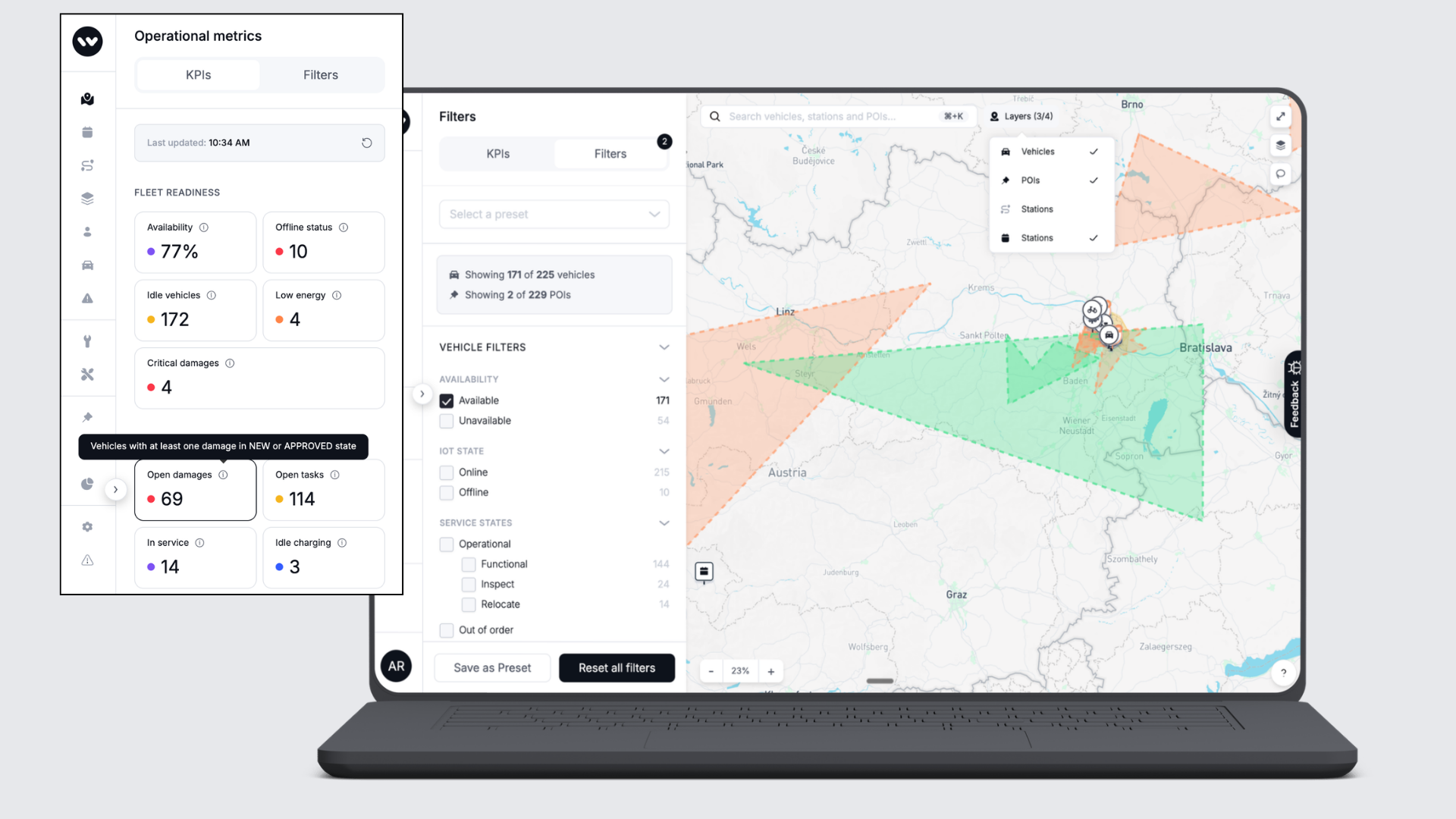
Smarter Ops Map for daily fleet management: The Ops Map now shows how many vehicles and POIs match your active filters at a glance, so fleet managers can assess workload and fleet state without counting manually. Hovering over any KPI tile now reveals a plain-language explanation of what that number means, turning the map into a more self-explanatory tool for daily operations.
Vehicle Promotions now support user-based targeting: Operators can now configure required or excluded user annotations directly on a Vehicle Promotion in the Dashboard, unlocking precise targeting based on user characteristics without workarounds. This can be used to run special vehicle-based promotions for users with/without active subscriptions, packages, passes or based on segmentation (e.g. users without a rental).
Mobile App
Requires the latest app version. Contact your Customer Success Manager for details.
General
Profile reflects updated address immediately: After completing the address update prompt during sign-in, the profile screen now shows the correct house number straight away, without requiring a log-out and log-in to see the change.
Station availability loads faster: A query behind the station-availability screen was generating thousands of unnecessary database calls on larger fleets, causing multi-second delays. This has been resolved, so the screen now responds promptly.
Extending a booking is no longer blocked by the previous cooldown: If a booking starts while the same vehicle is still in cooldown from the previous booking, that cooldown now ends at the new booking's start instead of running over it. Extensions that failed with the vehicle showing as unavailable now go through.
Configurable icons for on-demand stations: Operators can now assign distinct icons to individual on-demand stations on the map, making it easier for riders to distinguish between station types and enabling use cases that previously required all stations to look identical.
Fallback text edits now save correctly: Editing fallback messages for localization keys in the Dashboard now saves and returns the updated text immediately. Previously, some keys with missing locale assignments appeared to save in the UI but returned the old text from the API.
T&C acceptance no longer leaves the booking screen stuck: After accepting updated terms and conditions during the rental start flow, the screen now refreshes rental requirements automatically, so riders can proceed without having to restart the app.
New Dashboard
General
The Ops Map now fits smaller browser windows: The Ops Map layout now adapts to the width of the browser window instead of pushing the quick-filter panel out of view. On smaller laptop screens, or when you resize the window down, the quick filters stay visible and usable.
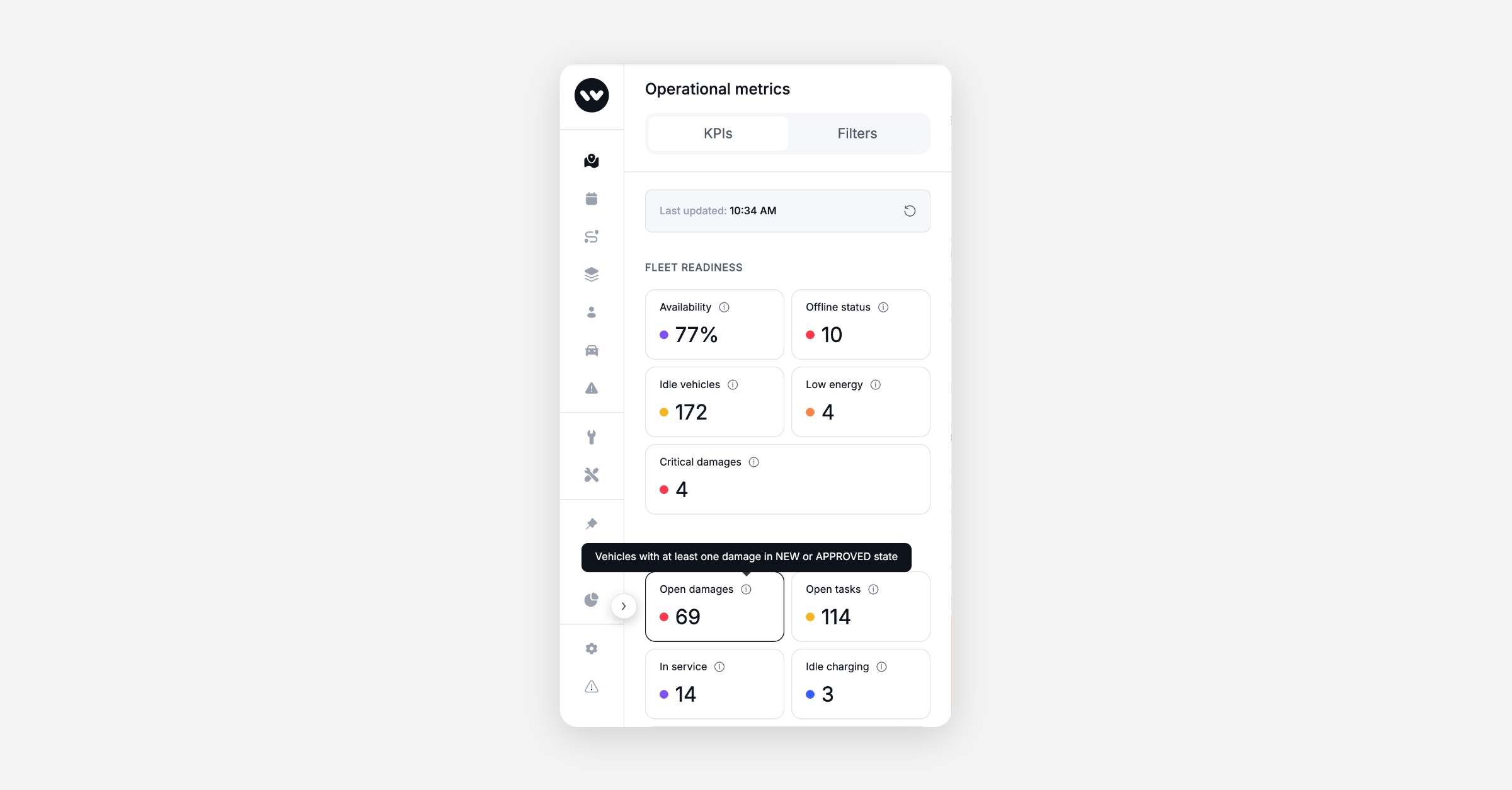
KPI tile descriptions on hover: Hovering over any KPI tile on the Ops Map now shows a short explanation of what that metric represents, helping operators interpret fleet readiness, utilisation, and service indicators without leaving the page.
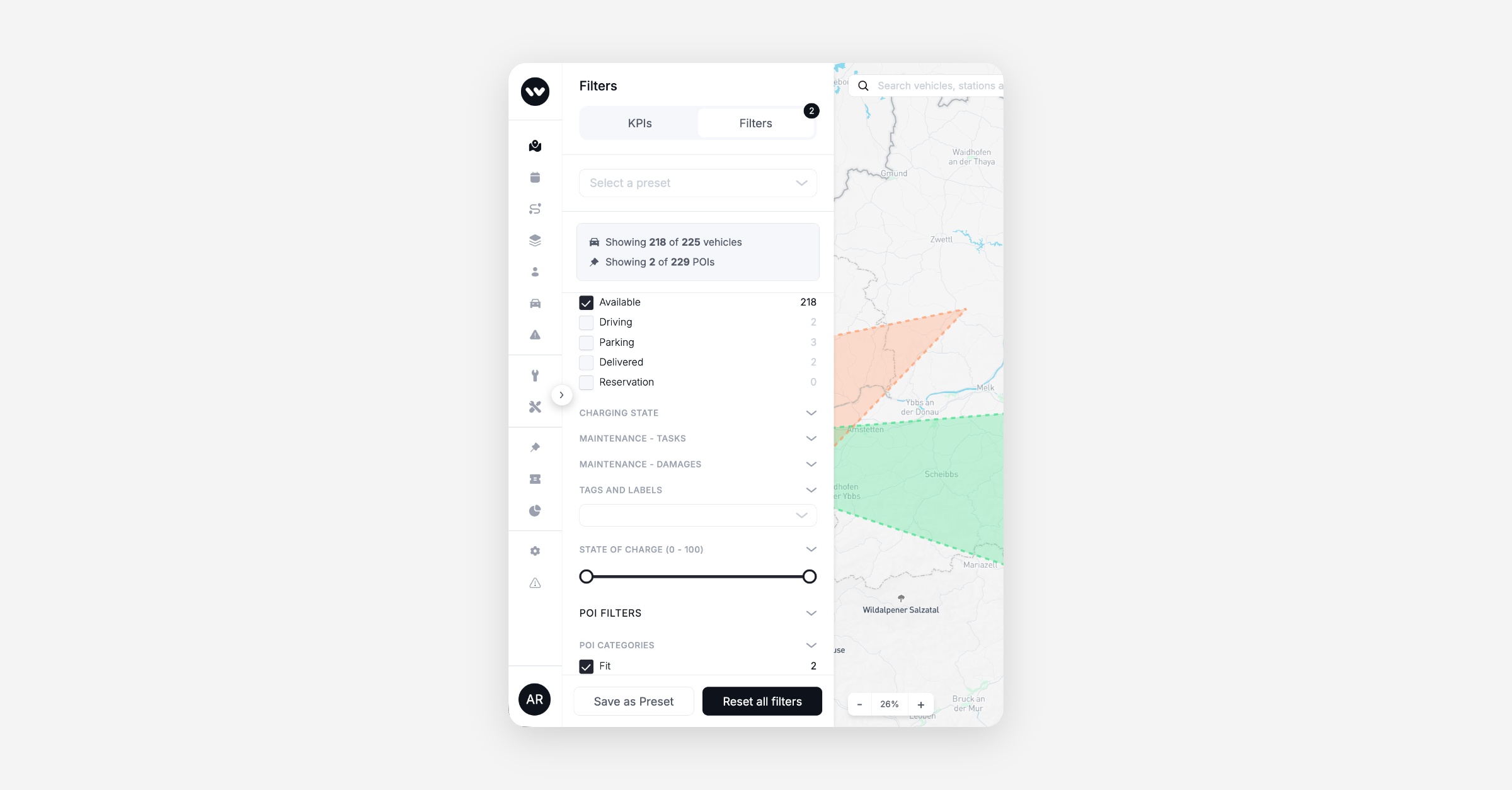
Filtered counts for vehicles and POIs: The Ops Map filter panel now shows how many vehicles and how many POIs match your active filters, each against the total on the map. Both lines update as you toggle filters, so you can see the effect of a filter without counting pins.
Booking
Vehicle Promotions now support user-based targeting: Operators can now configure required or excluded user annotations on a Vehicle Promotion directly in the Dashboard.
Platform
Error responses now use the correct HTTP status codes: Several conditions that a caller can fix, such as a missing permission or an invalid setting value, were previously returned as HTTP 500, which signals a server fault. These now return the appropriate 4xx codes, so clients and monitoring dashboards can distinguish caller errors from platform errors.
Data / BI
Wunder AI
Dormant and never-rented customers are now answerable: You can ask Wunder AI how many of your customers have not rented in the last 3, 6 or 12 months, and the answer includes people who have never rented at all. Ask for a window it does not hold and it says so and names the ones it has, rather than quietly answering on the nearest one. Try it: "Show the number of customers who have not rented in the last 6 months"
Damage and issue counts are now answerable: You can ask Wunder AI how many damages were reported over a period, and how many issues were raised per 100 trips. Issues here cover every issue category your team records, including purchases, fines and tolls, so the rate is not a vehicle-defect rate. Previously only service task counts were available.
Revenue by branch answers at your operational branch: Asking Wunder AI for revenue by branch, location or station now returns your operational branches.
Mobile Release - 3.15.0
General
Tracking consent management reworked: The consent flow that controls analytics and marketing tracking in the rider app has been reworked and now runs on a dedicated consent management platform. Riders see a refreshed consent prompt, and choices are enforced consistently across all tracking destinations with fail-closed semantics.
On-Demand
Configurable icons for on-demand stations: Operators can now assign distinct icons to individual on-demand stations on the map, making it easier for riders to distinguish between station types and enabling use cases that previously required all stations to look identical.